
Status of Land Letter in Trinidad and Tobago: How to Apply
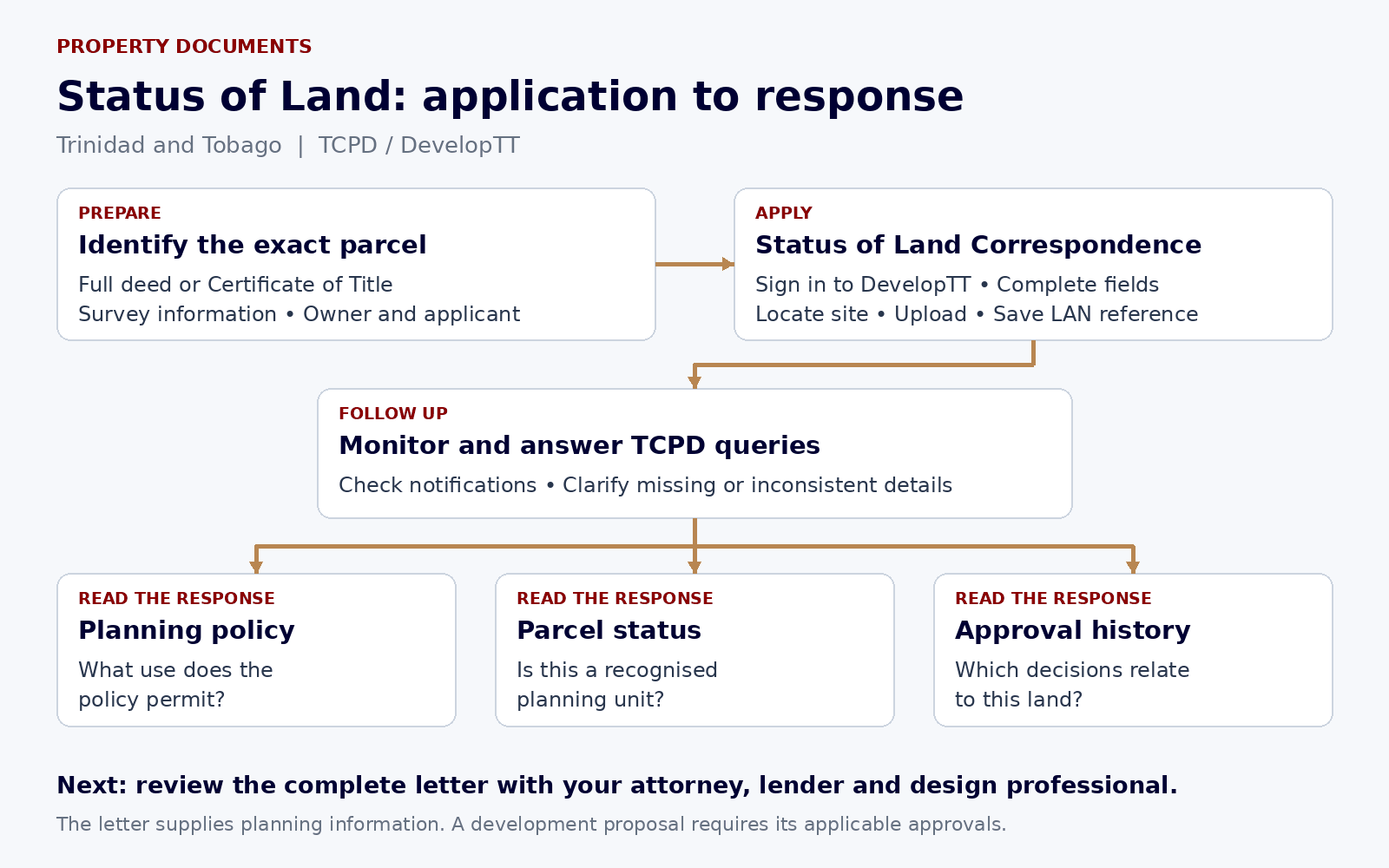
Apply for a Status of Land letter through DevelopTT by selecting Status of Land Correspondence, identifying the parcel and uploading the complete deed or Certificate of Title with the survey information. TCPD uses the application to report the land’s planning position. Follow the steps below to prepare the file, submit it and understand the response.
What does a Status of Land letter tell you?
A Status of Land letter is formal correspondence from the Town and Country Planning Division about an identified parcel. It addresses the permitted use under the mapped planning policy, planning approvals on or related to the site, and whether the parcel is recognised as a bona fide planning unit. TCPD describes that last question by reference to an approved subdivision or a parcel that existed before the relevant planning legislation.
The letter is useful when buying land, arranging finance or investigating a proposed home. For example, RBC’s residential mortgage checklist asks for a residential land status letter when purchasing residential land. Ask your own lender or attorney which document and date they will accept.
Read the policy position and the approval history separately. Land may lie within an area where residential use is contemplated without your particular house, subdivision or change of use having received approval. A letter does not transfer ownership, establish clear title, alter a State lease or grant permission to begin building.
Step 1: Identify the exact land you need checked
Start with the deed or Certificate of Title and the survey plan. Compare the lot number, area, boundaries, location and any reference to a larger parent parcel. The application must identify the land being bought or developed, not simply a street, neighbourhood or neighbouring property.
If you are buying one proposed lot out of a larger holding, ask the seller for the plan and subdivision approval that relate to that lot. Give these to your attorney and land surveyor where the documents do not clearly match. A plan showing proposed lots does not, by itself, establish that TCPD approved the subdivision.
Make a note of previous TCPD application numbers, letters and stamped plans available from the owner. Keep them with your file so TCPD can be asked about any apparent gap between the letter and the documents you hold.
Step 2: Prepare the title and survey documents
Upload the full deed, including every page, or the Certificate of Title. A cover page or an isolated schedule can leave out information needed to identify the property. Scan the document clearly and check that page edges, stamps and plan references remain legible.
The official checklist also requires cadastral or survey information for the site. Its survey requirements include a licensed land surveyor’s signature and clear identification of the parcel, its dimensions, shape, area and relevant adjoining ownership. Use the complete plan. A phone map pin or real estate advertisement cannot supply these details.
TCPD’s Status of Land checklist does not accept a Certificate of Comfort in place of the deed or Certificate of Title. If that is the only tenure document you hold, contact TCPD about your circumstances before submitting an incomplete file. This checklist rule does not decide your rights under other legislation.
- Complete deed or Certificate of Title, with all pages readable.
- Cadastral sheet or survey plan identifying the actual site.
- Accurate parcel address, lot or light pole details and area in square metres.
- Applicant and owner details, plus an email address that will be monitored.
- Previous planning references and correspondence, where available, to help identify the relevant history.
Step 3: Register or sign in to DevelopTT
Open the official DevelopTT portal and follow its current registration instructions. Use the login method shown by the portal. The e-Services page distinguishes services that anyone can view, such as the Public Application Register, from applications that require a registered applicant.
Once signed in, choose Status of Land Correspondence. Do not choose Planning Permission merely to obtain an information letter, and do not choose Stamp Duty Exemption Correspondence unless that is the separate service you need.
You can prepare your own application. The form also accommodates an applicant whose details differ from the owner’s. If an attorney, surveyor or other representative is helping, agree who will submit the application, receive queries and retain the final correspondence.
Step 4: Complete the applicant, owner and parcel fields
Enter the applicant’s name and contact details. Where the applicant is not the owner, indicate that the details differ and complete the owner fields. Use the title documents to check the names rather than relying on the name in a property advertisement.
Select the island and community, enter the site address and provide the lot number, light pole number or mile marker as applicable. The manual specifies the parcel area in square metres. If your document uses another unit, verify the conversion before entering it; do not confuse the area of the parent holding with the area of the requested lot.
Select the appropriate entries for purpose and status of land, and describe existing structures accurately. Those entries describe the application; selecting residential use is not an approval or a means of changing the planning policy. If an option does not fit the documents, ask the help desk or regional office how to record it.
| Part of the form | What to check |
|---|---|
| Applicant | Name, contact details and applicant particulars requested on the form. |
| Owner | Complete the separate owner details when the applicant differs from the owner. |
| Location | Island, community, address and lot / light pole / mile marker information. |
| Area | The area of the actual parcel in m². |
| Land and structures | Relevant purpose and status selections, with a description of existing buildings. |
Step 5: Add notifications, locate the site and upload the file
Enter the notification email address. The applicant manual makes this mandatory and provides optional alternate email fields and a mobile number. Use an address you can access throughout the application. A representative should arrange to forward TCPD’s queries and decision to the owner.
Follow the Site Location stage to identify the correct parcel on the portal’s map. Check its position against the survey, roads and location details. A pin on the wrong side of a road or on the parent parcel can create uncertainty about what is being assessed.
At the Documents stage, attach the required title and survey files and complete the upload action. Check that the uploaded documents appear in the application before proceeding. Follow the live portal’s file requirements; the document checklist does not justify substituting a cropped image for a full plan.
Step 6: Review, submit and save the LAN reference
Read the Summary screen against your documents. Check the applicant, owner, site, parcel area and uploaded files. Read the terms and conditions before agreeing and submitting.
The applicant manual describes a successful submission message with a reference beginning LAN. Save that reference, the submission confirmation and a copy of the application. A saved draft is not the same as a submitted request.
What does it cost, and how long does it take?
There is no published TCPD application charge for obtaining Status of Land correspondence through DevelopTT. The Planning Ministry’s 3 September 2026 announcement states that DevelopTT services are available online at no cost to the public. Professional assistance, obtaining copies of documents or commissioning survey work can involve separate costs. Agree those charges with the provider.
The DevelopTT service listing displays 21 processing days for Status of Land Correspondence. Treat that as the published processing period, not a guaranteed delivery date for every file. The listing does not define those days as calendar or working days. Ask TCPD about the expected date for your application, particularly if a purchase or mortgage deadline depends on it.
The six-minute figure beside the service refers to completing the online application. It does not mean that TCPD will issue the letter in six minutes. Preparing scans, resolving survey discrepancies and answering queries take additional time.
Step 7: Monitor the application and answer queries
Check your DevelopTT account and notification email for updates. If TCPD requests a clearer plan, missing pages or clarification of the parcel, respond through the application process and retain the response. Use the LAN reference when seeking an update.
For login or upload problems, contact the DevelopTT help desk on 800-4DEV (4338) or support@developtt.gov.tt. For questions about the land, policy or planning records, contact the relevant TCPD regional office. Give the reference and parcel details so the officer can identify the file.
Step 8: Read the issued letter against your documents
Check that the response relates to the correct land. Compare the address, lot, area, survey references and any parent-parcel description with your application. Save the complete issued correspondence, including attachments.
Then read the permitted-use statement, the parcel’s recognised status and the planning history. Where an earlier approval is mentioned, obtain and read the actual decision and approved plan. Check what it authorises, the area it covers and its conditions before deciding that it supports your proposed purchase or building.
If a reference is missing or a parcel detail appears wrong, raise the specific issue with TCPD using the LAN reference and supporting documents. If the letter reports agricultural policy and you want residential use, the next question is the planning application required for that proposal. Correcting a factual error and applying for a different use are separate tasks.
Step 9: Give the letter to the people making the decision
Send the complete letter and relevant plans to your conveyancing attorney and, where applicable, your lender and design professional. Your attorney still needs to investigate title, restrictions and the transaction. Your designer still needs to establish the permissions required for the proposed works.
Before paying a deposit or committing to construction, resolve any mismatch between the seller’s description and the planning record. Agree any conditions in a sale contract with your attorney. A favourable status letter should be read alongside the actual approvals, legal access, title and servicing position.
Common questions about Status of Land letters
Does it convert agricultural land to residential land? No. It provides information about the identified parcel. A proposed material change of use is dealt with through the planning process, with any separate lease and other approvals that apply.
Is it the same as Town and Country approval? No. Planning permission is a decision on a development proposal. Status correspondence reports the land’s planning position and relevant history.
Is it a Stamp Duty Exemption letter? No. DevelopTT lists Stamp Duty Exemption Correspondence separately. Ask your attorney or Inland Revenue which document is required for the transaction; do not assume the status letter grants a tax exemption.
Does it expire after a fixed number of months? The Status of Land checklist and application manual do not prescribe a universal expiry period. A recipient may ask for recent correspondence, and planning circumstances can change. Confirm the required age with your lender or attorney.
Can a buyer apply before owning the land? The form provides for an applicant who is different from the owner. You still need the required title and survey documents and accurate owner details. Ask the seller for the complete file.
Application links, regional offices and professional help
Use DevelopTT for submission and tracking. The regional offices below handle location-specific TCPD enquiries. Check the official contact page before travelling. Use the professional directory to find survey and legal practices and the links for checking their professional standing.
| Office | Telephone | |
|---|---|---|
| DevelopTT help desk | 800-4338 | support@developtt.gov.tt |
| North: Eric Williams Finance Building, Independence Square, Port of Spain | 868-612-3000, ext. 2160 / 2165 | tcpdnro@planning.gov.tt |
| South: Palms Club, Point a Pierre Road, San Fernando | 868-226-4223 / 652-7989 | tcpdsro@planning.gov.tt |
| North East: Tunapuna Administrative Complex, Eastern Main Road | 868-663-2726 / 226-4192 | tcpdero@planning.gov.tt |
| Tobago: Pump Mill Plaza, Plymouth Road and Pump Mill Trace, Scarborough | 868-639-2663 | tcpdtro@planning.gov.tt |
- DevelopTT e-Services: apply and sign in
- DevelopTT registration and application guidelines
- TCPD Status of Land document checklist
- DevelopTT applicant manual: Status of Land, pages 97–102
- DevelopTT contact and support
- TCPD regional offices and contact details
- Surveyors, attorneys, authorities and application forms
Discuss your land project
Tell us the location, the documents you hold and the development you have in mind.
Contact DSDillonThis guide provides general information. Obtain advice on the title, lease, site and approvals for your particular proposal.
